Designing the Future: UX/UI for AI-Powered Applications Across Industries

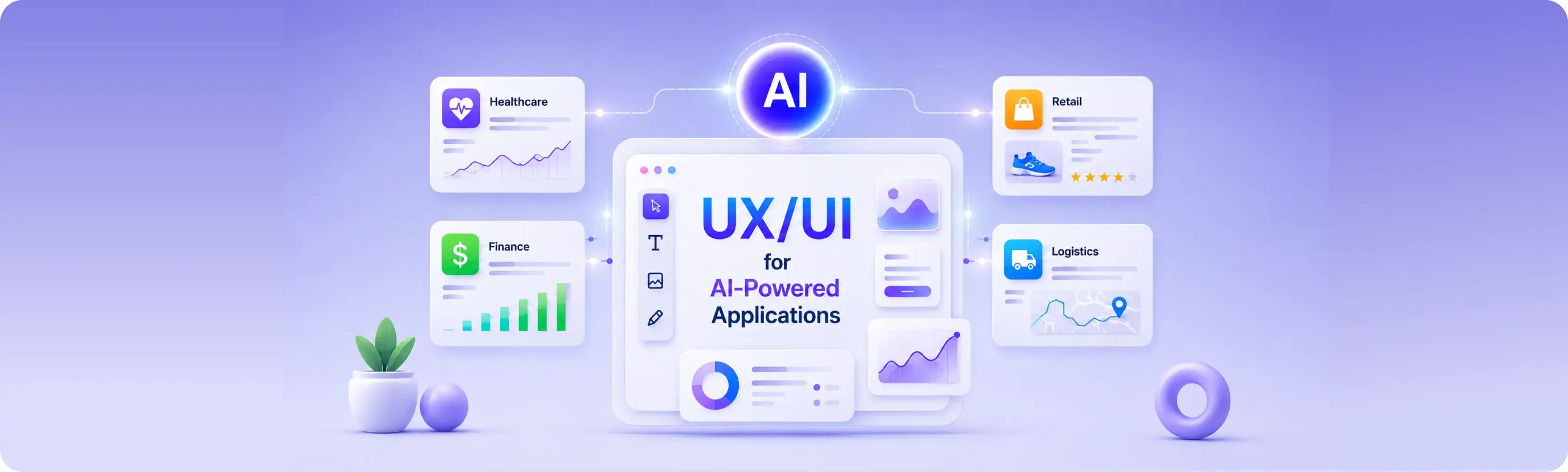
AI is no longer a futuristic concept—it’s already embedded in how we shop, learn, travel, transport and manage our health. But as AI becomes more powerful, it also becomes more complex. That's where UX/UI design for AI comes in.
Designers today are responsible not only for making applications look good—but for ensuring users trust, understand, and feel in control when interacting with AI Powered Application.
What Is an AI Powered Application?
AI is showing up in more places than you might think—and not just in chatbots or voice assistants. Many apps we use every day are quietly powered by AI to make things faster, smarter, and more helpful. Here are some real-world examples of how different industries are putting AI into action today:
1. E-commerce & Retail
- Product Customization: AI helps customers visualize products with different colors, materials, or patterns (e.g., Nike By You).
- Smart Virtual Try-On: Uses AI and AR to let users try on clothes, glasses, or makeup before purchasing (e.g., L'Oréal Virtual Try-On).
- Personalized Shopping Assistants: AI recommends products based on browsing and purchase history (e.g., Amazon, Shopify).
2. Healthcare
- Medical Imaging Analysis: Enhances MRI, X-ray, and CT scan visualization for faster diagnosis (e.g., Google’s DeepMind Health).
- Chatbots for Telemedicine: Provides patients with symptom analysis and connects them with doctors (e.g., Ada Health, Babylon Health).
- Wearable Health Monitoring UX/UI: AI helps design intuitive dashboards for fitness and health tracking (e.g., Apple Health, Fitbit).
3. Finance & Banking
- Fraud Detection Dashboards: Uses machine learning to flag suspicious transactions with clear visual alerts (e.g., PayPal, Visa).
- Investment Advisors: User can use robot-advisors that suggest stock or crypto investments (e.g., Betterment, Wealthfront). Smart
- Budgeting & Expense Tracking: AI helps users categorize and visualize spending patterns (e.g., Mint, YNAB)
4. Automotive & Transportation
- Autonomous Vehicle Interfaces: AI assists in designing dashboards for self-driving cars based on what the car “sees,” such as other vehicles, pedestrians, and traffic signs (e.g., Tesla Autopilot UI) .
- Route Optimization: Use AI to calculate the fastest and most efficient routes based on traffic, weather, roadblocks, and driver behavior (e.g., Uber, Waze).
- Smart Traffic Management Systems: Uses AI to design real-time traffic flow dashboards for city planning (e.g., Google Traffic).
5. Education
- Personalized Learning Platforms: Adapts content to student performance and progress (e.g., Duolingo, Khan Academy).
- Automated Grading & Feedback: AI provides visual feedback for essays and assignments (e.g., Gradescope).
- Virtual Tutors: Enhances UX for chat-based AI virtual tutors (e.g., ScribeSense, Querium, Elsa).
6. Media & Entertainment
- Content Recommendation Engines: AI helps personalize user experience by suggesting shows, movies, or music based on past behavior (e.g Netflix, Spotify)
- Generated Content Tools: Help creators generate music, videos, or even written content with minimal manual effort. (e.g., Runway ML, Soundraw).
How to Design UX/UI for AI Powered Applications: A Practical Process
With the rapid adoption of AI across countless industries—each with distinct goals, user needs, and data contexts—designers are increasingly faced with a critical question: Where and how to design UX/UI for AI Powered Applications? AI brings complexity, but the goal stays the same: create interfaces that feel clear, helpful, and trustworthy. There’s no one-size-fits-all process, but the practical process below offers to design user-centered AI products—from understanding the problem to testing and improving your solution that you can learn from.
To make it easier to follow, we’ll use a real example: ELSA Speak — an AI Product many of you might know which help people improve their English speaking by using AI to check pronunciation, give real-time feedback, and suggest lessons based on how you speak. Let go how to design this kind of product in examples, step by step.
Step 1: Define the Problem & Check AI Capabilities
Before designing anything, start here: Is AI even the right solution?
Not every problem needs AI. Begin by understanding how users currently do the task—with and without AI. Dig into their pain points, behaviors, and expectations. Also, learn what AI can realistically do: Can it recommend, predict, generate content or automate steps?
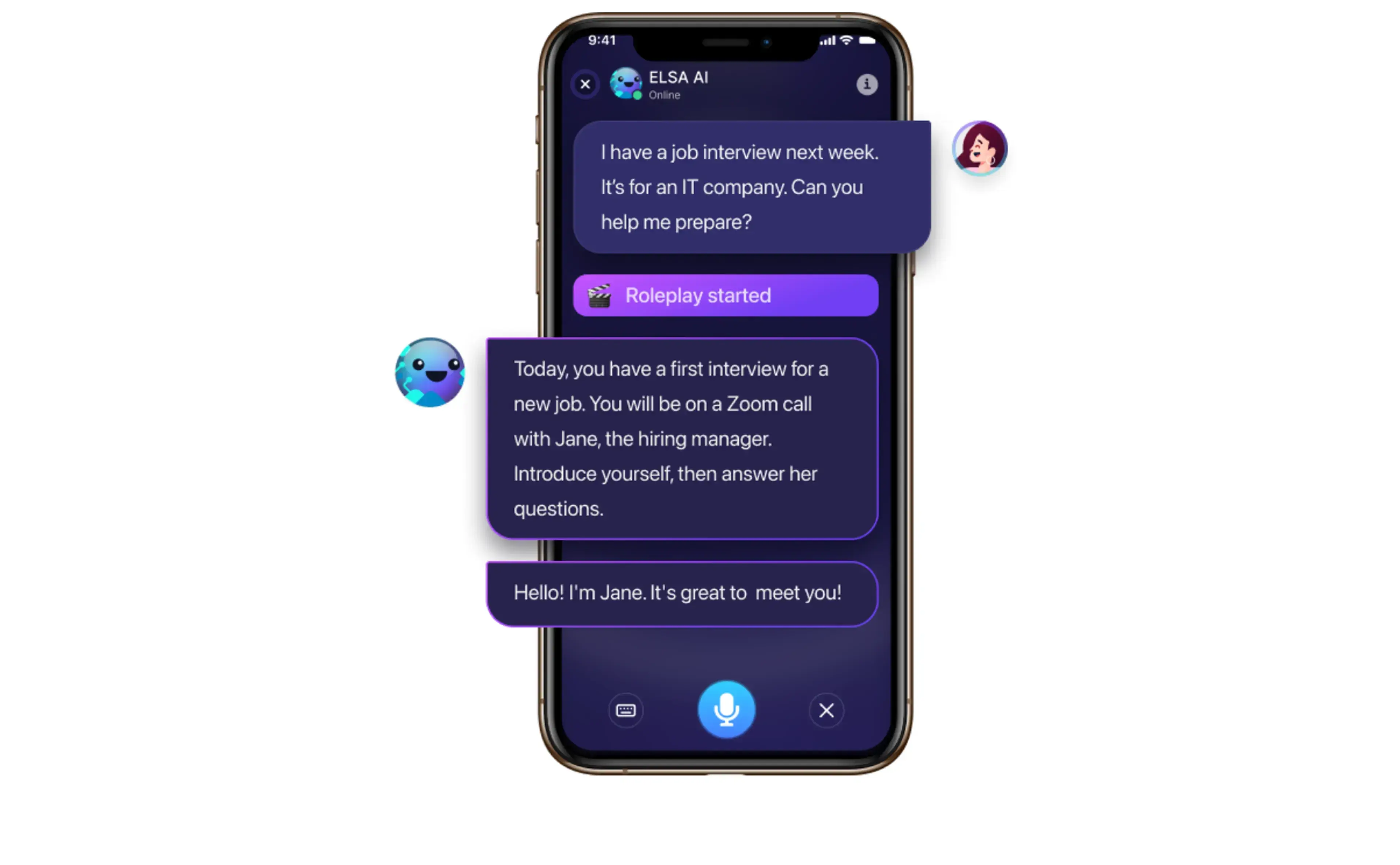
Example: in the ELSA app, many non-native English speakers struggle with pronunciation and don’t always have access to native speakers or instant feedback. ELSA solves this by using AI and natural language processing (NLP) to analyze how users speak, while interactive AI enables real-time conversations and corrections, simulating a native speaker experience.
Step 2: Identify Data & AI Constraints
Now get technical. Talk with your developer and stakeholders to understand these constraints early and helps avoid over-promising and under-delivering. What data do we need? What are the limitations—accuracy, response time, or bias? What will the AI struggle with?
Example: For our pronunciation app: The AI needs lots of audio data from native and non-native speakers. It must analyze voice input and respond within 1 second. Accuracy should be 90%+ to build trust. But challenges include background noise, regional accents, and low-quality microphones.
Step 3: Map the User Journey & AI Touchpoint
Map out the full user journey and highlight the points where AI can support, suggest, or decide. Also mark trust-sensitive moments—where AI makes choices for the user. These are points where you should be transparent, show explanations, or give users control.
Example: In our pronunciation app, AI step in in these stages:
- Practice stage: AI analyzes pronunciation and gives feedback instantly.
- After practice stage: Show feedback, confidence scores, explain suggestions, or give examples.
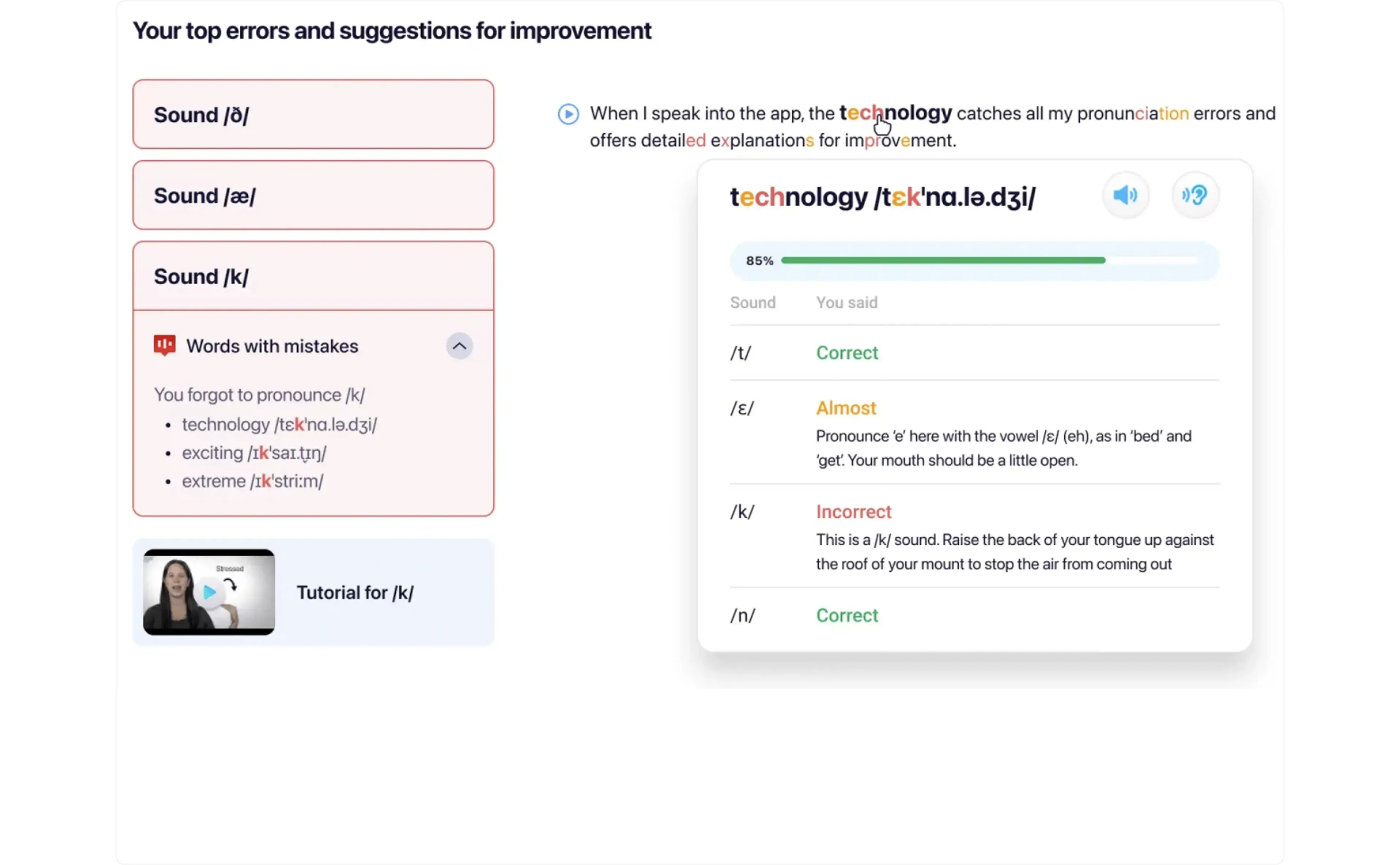
- Virtual Assistance stage: the AI offers real-time speaking tips, suggests corrections, and even simulates conversations to help users speak more like native speakers.
Step 4: Wireframes & Interaction Design
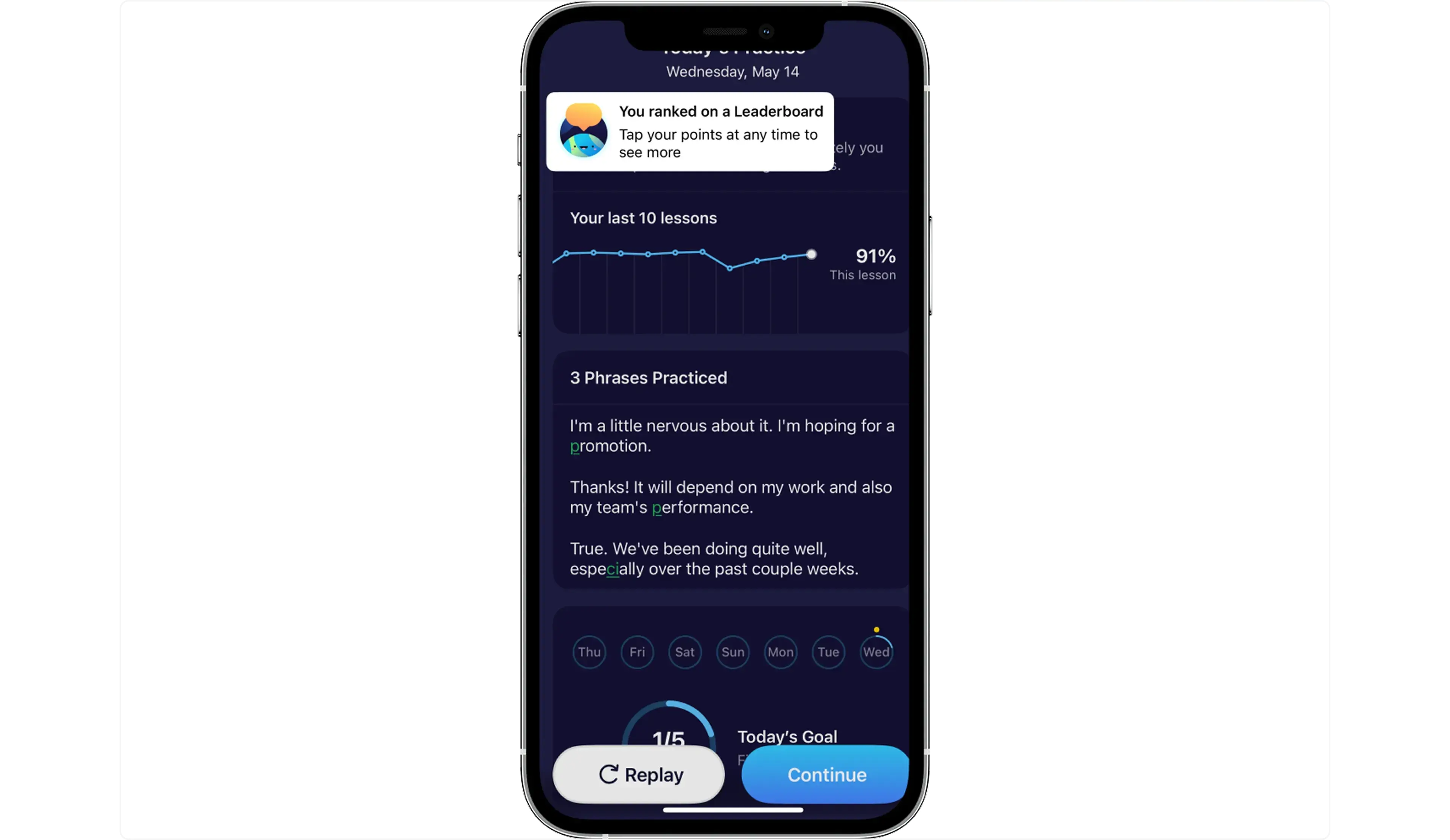
This is where we focus on user control and user experience. Let users override AI suggestions or undo actions when needed, be transparent if AI isn’t sure, and guide them with helpful error messages. AI apps often handle sensitive user data. Design trusted user experience for AI Product should allow users to delete their data and opt out of certain data collection if desired.
Example: After feedback, users can tap “Replay” option to practice. In settings, users can delete voice history or opt out of sending audio data for improvement. If background noise, show a friendly message: “We couldn’t hear you clearly. Try again in a quieter place.”
Step 5: Visual Design & Branding
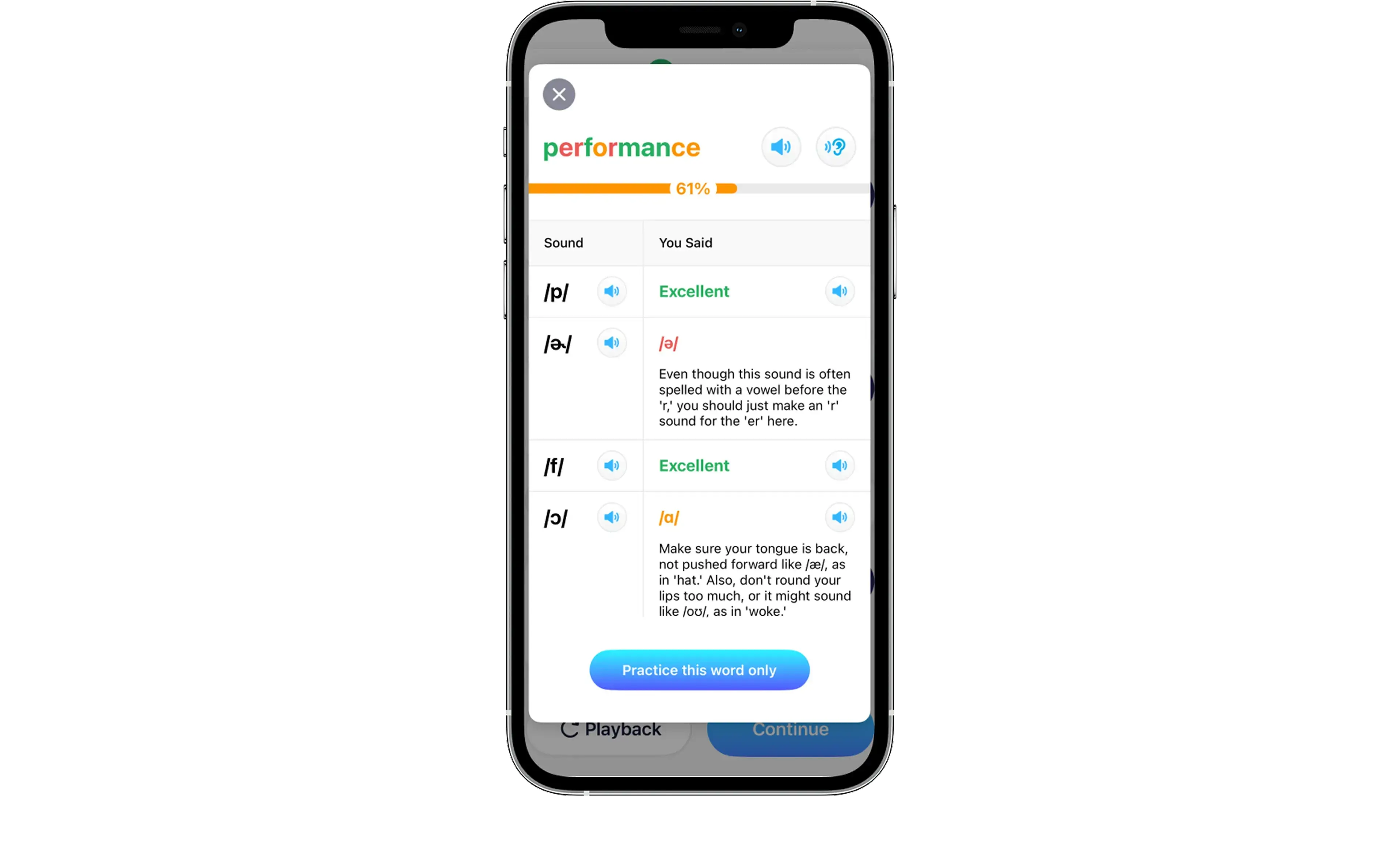
When designing visual, AI application interface design should make interactions feel intuitive, friendly, and trustworthy. Use color-coded confidence indicators (green/yellow/red) and simple icons or tooltips to show how confident the AI is. Add short explanations like “Based on your input” to build trust. Stick to your brand’s design system so AI features feel familiar. Support accessibility with voice feedback, high contrast, and screen reader compatibility.
Example: Keeps feedback simple, with visual cues like color-coded phonemes (green for correct, red for incorrect), provides audio feedback for visually impaired users and supports voice commands for hands-free navigation, making the app inclusive for all users.
Step 6: Test, Iterate & Improve
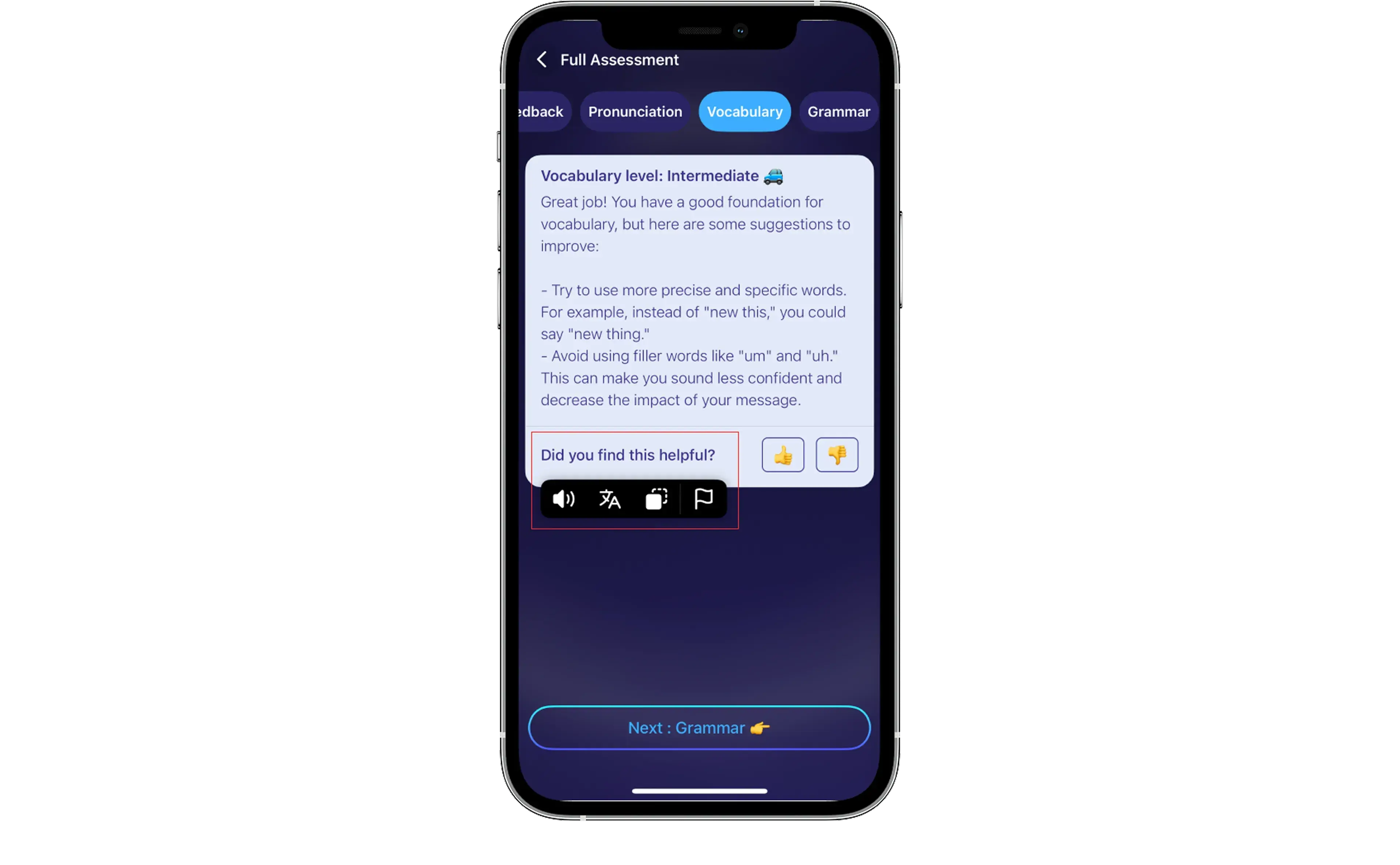
AI should always be improving—and users can help with that. Let them rate suggestions, report issues, or give feedback on how helpful the AI Product was. Use that feedback to improve the model and the UX.
Example: After virtual speaking session, ELSA asks users, “Did you find this helpful?” and allows them to rate the feedback, collected and analyzed to enhance accuracy over time.
Best Practices for AI UX Design
UX/UI Design for AI isn’t just about adding smart features. It’s about being thoughtful, responsible, and user-centered every step of the way. Keep these core principles in mind:
- Know the real problem: Focus on the actual user pain points before jumping into AI solutions.
- Understand what AI can (and can’t) do: Be realistic about the capabilities and limitations of your AI model.
- Be transparent and respectful: Clearly communicate how AI works and give users control over their data.
- Build trust through good UX: Use simple, intuitive design to make AI feel helpful and human.
- Improve based on feedback: Continuously learn from user input to make your AI smarter and your product better.
Conclusion
As AI continues to change how we interact with software, whether you’re building a voice assistant, smart chatbot, or any AI-powered experience - make these experiences human-friendly, trustworthy, and transparent. The future of AI isn't just in algorithms—it’s in how we design the bridges between people and technology!
References
https://medium.com/design-bootcamp/how-to-design-ai-products-c81739b10c99
https://hashtriplezero.medium.com/ux-design-best-practices-for-ai-powered-applications-d5e47c46650c