Applying AI in a Real Product Workflow: Stock Transfer UX Case Study


Instead of manually designing each screen from scratch, AI has recently been integrated into the design workflow as a supporting tool to improve efficiency and iteration speed. This case study outlines a practical approach to leveraging ChatGPT, Figma Make to address a feature enhancement for Stock Transfer within a veterinary clinic management system.
1. Requirement Analysis
1.1 Current System
The current Stock Transfer system enables departments to request and track internal stock movement through statuses such as Draft, Pending, Ready, and Collected.
Each request includes multiple products, with fulfillment managed at the product level and typically linked to a single LOT per product.
1.2 Enhancement
This project focuses on enhancing the stock transfer workflow for medications and supplies across different locations within a veterinary clinic system. Based on the initial requirements from Jira, ChatGPT was used to analyze and break down the problem areas for enhancement:
1.3 Core Workflow
Creation > Submission > Fulfillment > Readiness > Collection > Completion
2. Designing with Figma Make
Figma Make was used as the core tool to generate wireframes and interactive prototypes based on structured prompts. The workflow involved continuous iteration between prompt refinement and output evaluation, which resulted in a high number of versions due to evolving requirements rather than tool limitations.
Within 3 days, the design reached approximately 180 versions, and around 120 iterations were enough to consume the monthly limit of 3,500 credits (~$55), highlighting cost as a practical constraint when scaling AI usage.
Despite this, the efficiency gain was significant, reducing wireframing and prototyping time from approximately 10 days to 3 days (around 70% faster) - which enabled faster iteration and earlier stakeholder alignment.
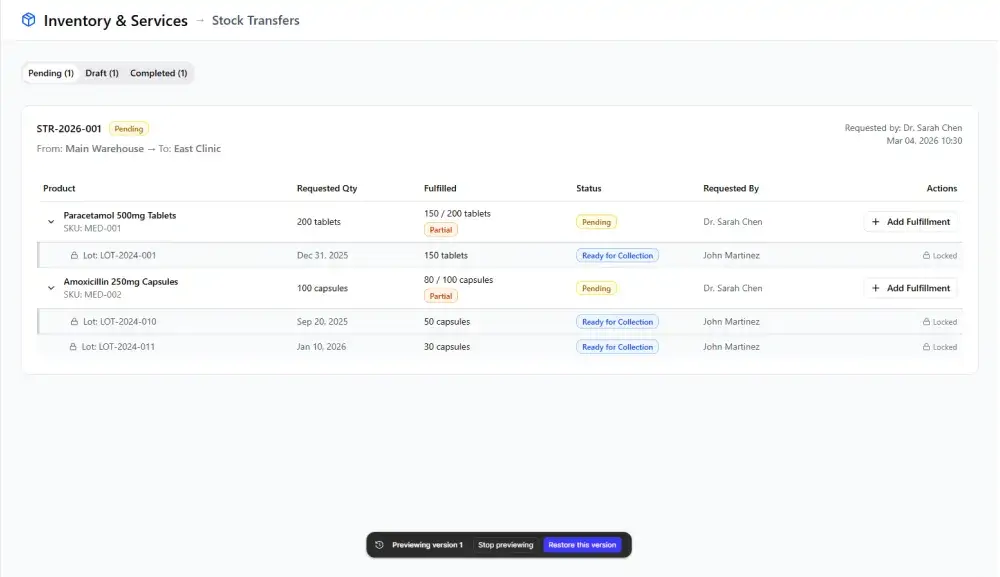
This is the initial version based on the requirements:
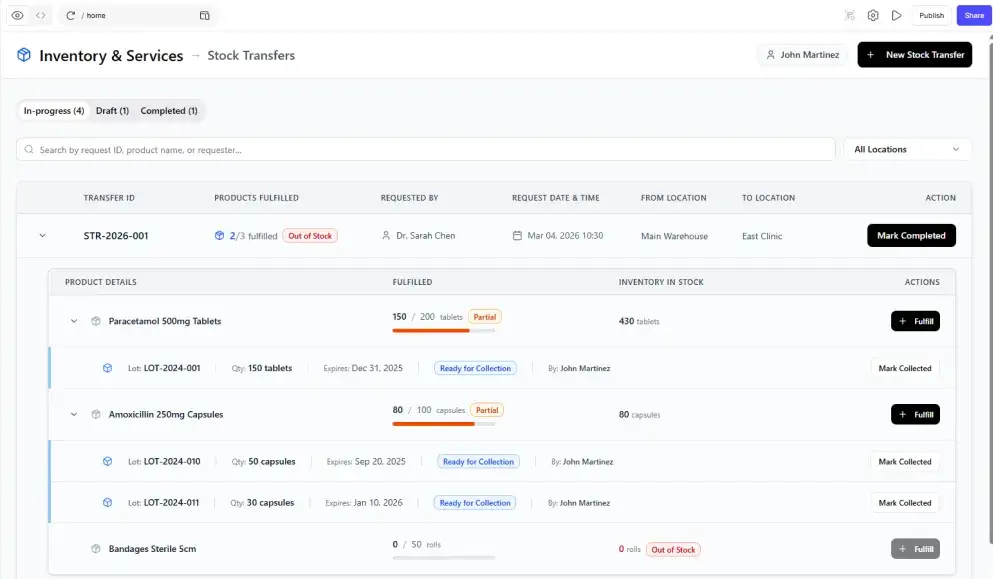
This is the final version:
2.2 UI Branding Alignment
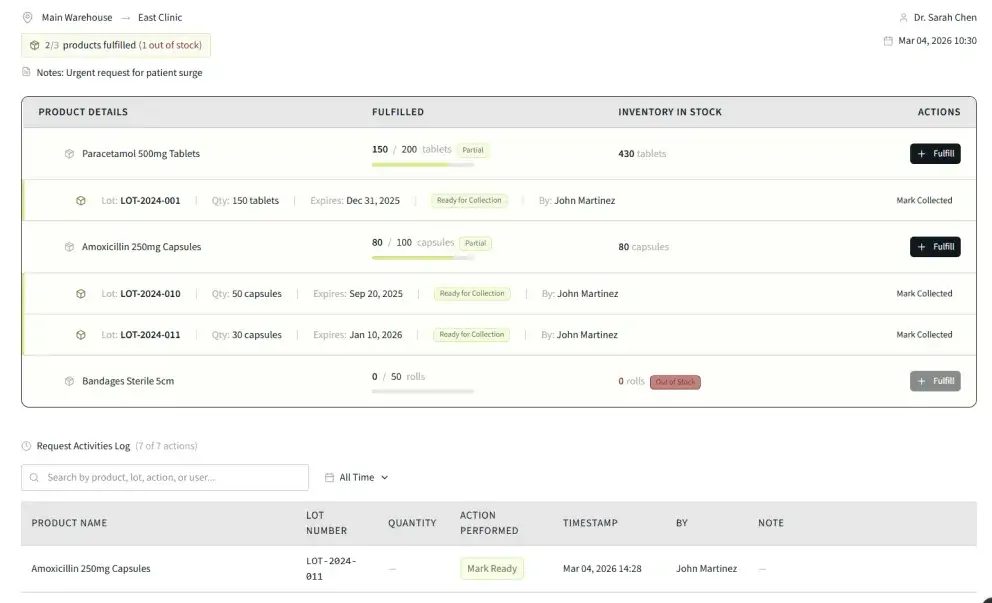
Following the establishment of stable wireframes and flows, the next phase involved transitioning to high-fidelity UI aligned with the Client’s design system. At this stage, the limitations of AI-generated UI became more evident, as visual hierarchy, spacing consistency, component usage, and adherence to design tokens still required deliberate designer input.
This is the result after prompting Figma Make to apply the UI kit based on the Client’s branding:
2.3 Evaluation
Strengths:
- Strong in UX flow generation and system thinking.
- Handles complex logic and states effectively.
- Supports interactive prototyping.
- Easy to export and continue editing in Figma.
Weaknesses:
- Limited capability in visual UI execution; outputs remain generic and lack design polish.
- Applying an existing design system (library kit) does not consistently produce expected results.
- May require additional effort to restructure or optimize the design system for better AI interpretation.
- As feature complexity increases, cost and performance become key constraints.
- Performance issues (e.g., render overload) when handling complex interaction logic.
2.4 Conclusion
Figma Make is most effective for wireframing, flow definition, and handling complex logic, but it is not yet reliable for producing high-fidelity UI aligned with a production-level design system.
Ultimately, AI tools should be viewed as accelerators rather than replacements. The most effective workflow combines structured thinking (e.g., using ChatGPT), rapid UX iteration and visual exploration (still limitation) with the designer maintaining control over final decisions, system consistency, and product quality.